Every designer eventually builds a tracker. Most abandon it by month two, because it tracked everything and therefore required constant feeding.
The tracker that survives is the one that only holds things you would otherwise have to remember or chase.
The short answer
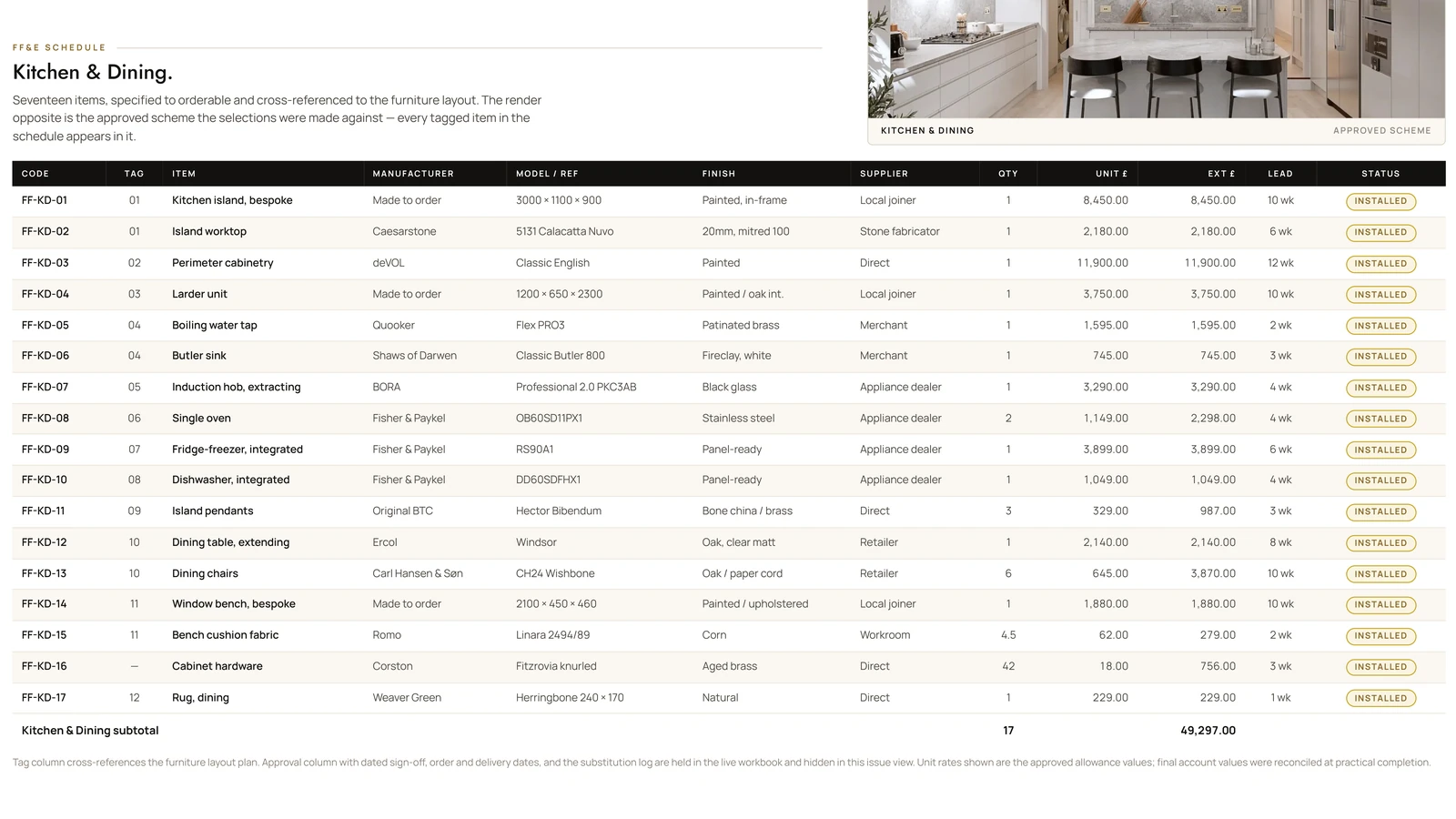
Track four things and nothing else, or the tracker dies by month two. Decisions — not tasks — with an owner and a date, because most delay is a decision sitting unmade while everything behind it waits. Procurement with lead times, which is what an FF&E schedule is for, since a sofa ordered on time still arrives late if nobody checked it was fourteen weeks. The approval log: what was approved, by whom, when, in what form. And budget against actual, updated when things are ordered rather than when they are invoiced, so it can still steer.
The four things worth tracking
Decisions, with owners and dates. Not tasks — decisions. What needs deciding, who decides it, and by when. Most delay in interior projects is not slow work, it is a decision sitting unmade while everything behind it waits.
Procurement, with lead times. Item, supplier, order date, expected delivery, status. Lead time is the column people omit and then regret: a sofa ordered on time still arrives late if nobody checked it was fourteen weeks.
The approval log. What was approved, by whom, on what date, in what form. Dull until it is the only thing that settles an argument, at which point it is worth the whole tracker.
Budget against actual. By category, updated when things are ordered rather than when invoiced. A budget that only updates at invoicing tells you what went wrong after it is too late to steer.
The four sheets, column by column
This is twenty minutes of setup in any spreadsheet, and it is the whole system.
- Decisions — what needs deciding | who decides | needed by | status | what it blocks. The last column is the one that makes the sheet persuasive: “blocks the joinery order” moves a client that “overdue” does not.
- Procurement — item | supplier | product code | ordered on | lead time in weeks | due on site | status. Calculate due on site from the order date and the lead time rather than typing it, so it moves when the order slips.
- Approvals — what | approved by | date | form (email, signed PDF, meeting minute) | reference. Dull until it is the only thing that settles an argument.
- Budget — category | allowed | committed | actual | variance. Update committed when you order, not when you are invoiced; the gap between those two is where overspend hides for six weeks.
Four sheets, roughly thirty columns, no software to buy. If it needs more than one screen to read, it has stopped being a tracker and become a second job.
What not to track
Hours, unless you bill by them. It generates admin and tells you nothing you cannot feel.
Every task. Granular task lists in interior projects go stale within days, and a stale tracker is worse than none — people stop trusting it, then stop reading it.
Anything already tracked elsewhere. If the supplier portal shows delivery status, link to it rather than duplicating it. Every duplicate is a future inconsistency.
Make it visible
The single change that makes a tracker worth maintaining: let the client see it.
Most status-chasing emails exist because the client has no way to check. Give them a read-only view and the majority stop — not because they lose interest, but because the anxiety that produced the email is answered.
It has a second effect, less comfortable and more valuable. When a project slips because a decision has been sitting with the client for eleven days, the tracker says so without anyone having to. The conversation shifts from blame to a shared document, which is a much easier conversation to have.
Keep it maintainable
Update at fixed points, not continuously. Once a week, plus whenever something is ordered or approved. Continuous updating is how trackers become a second job.
Use the same structure on every project so updating is muscle memory rather than a decision. And use whatever tool you will actually open — a maintained spreadsheet beats an abandoned project-management app, every time, without exception.
What good looks like
You should be able to answer, in under a minute and without opening your email: what is late, what is waiting on the client, what is arriving this week, and how much of the budget is committed.
If your tracker cannot answer those four questions, it is recording activity rather than managing a project — and it will be abandoned, correctly, within the month.